🔍 Is Your Mac Still Under Warranty?
Learn how to check the Serial Number, Model, and Year of your Mac – Super Easy!
Ever wondered if your beloved Mac is still under warranty? Or maybe you're about to sell it but not sure which year it’s from? Don’t worry! It's easier than you think. Once you know your Mac's Serial Number, you can check almost everything. This guide will walk you through it, step by step!
🔍 4 Easy Ways to Find Your Mac’s Secret Agent (Serial Number)
🔍 4 Easy Ways to Find Your Mac’s Secret Agent (Serial Number)
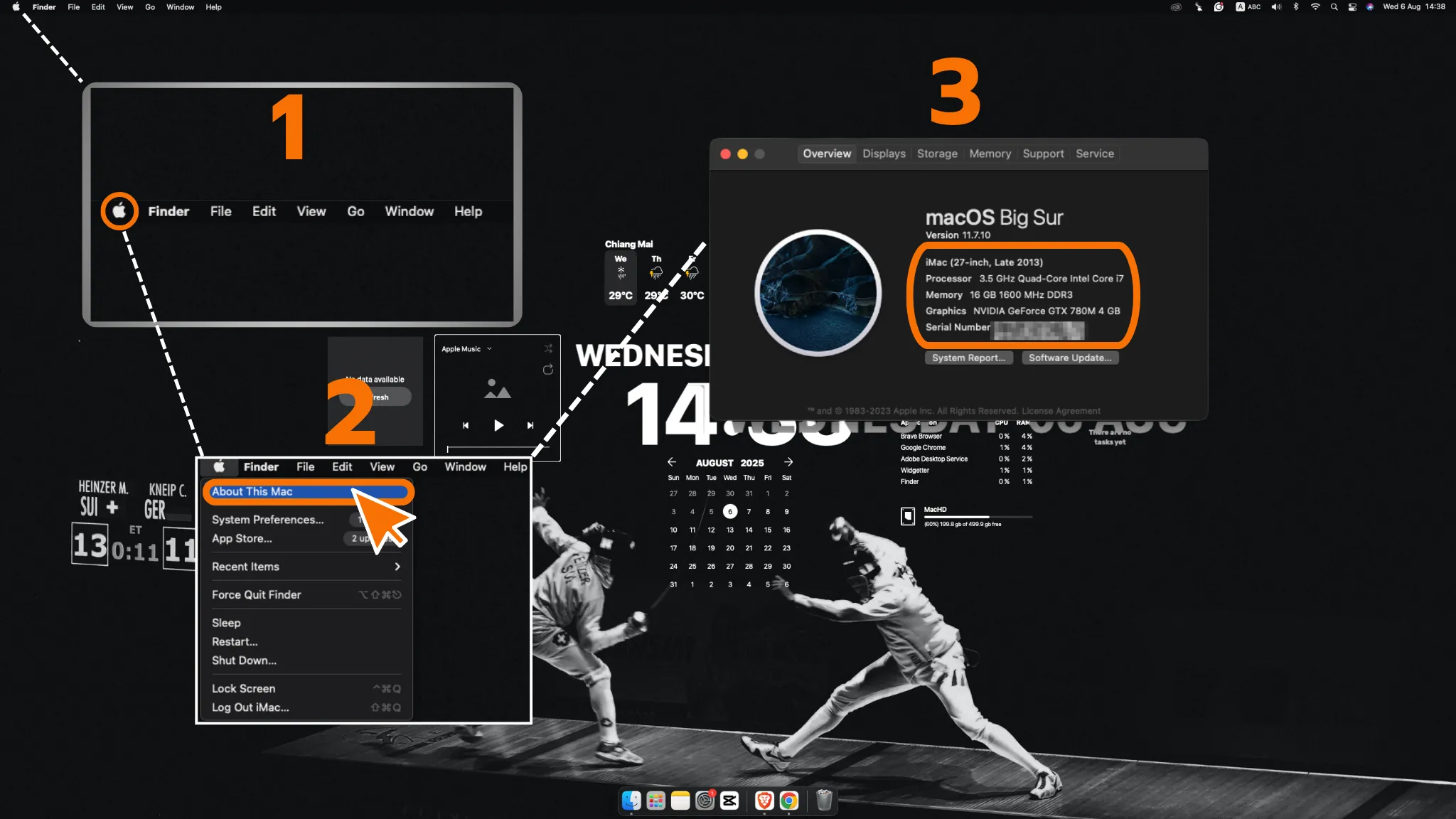
Method 1: The Easiest Way – Check “About This Mac”
This is the fastest method. Just:
This is the fastest method. Just:
- Click the Apple logo at the top-left corner
- Select About This Mac
- Boom! A window will pop up showing your Mac’s model name, year, chip, and serial number all in one place.
Method 2: For Power Users – Use System Information
If you want more detailed info:
- Press Command + Spacebar to open Spotlight
- Type System Information and press Enter
- In the window that appears, click Hardware – everything you need is listed right there
Method 3: Old-School Style – Check Under the Mac (MacBook only)
For MacBook users, simply flip your device over. You’ll see small engraved text underneath – your Serial Number is there too.
Method 4: When Your Mac Isn’t With You – Use Apple ID
As long as your Mac is signed in with your Apple ID:
- Go to System Settings > [Your Name]
- Scroll down to find your Mac in the list of devices
- Click on it, and you’ll find the Serial Number inside
🚀 Got the Serial Number? Time to Check Warranty Status!
Once you’ve got your Serial Number, here’s how to check:
- Go to Apple’s warranty check website: https://checkcoverage.apple.com
- Enter your Serial Number
- Type the CAPTCHA code, then click Continue
- That’s it! The system will tell you everything – warranty status, purchase date, and repair eligibility
✨ Tips for Buying Secondhand Macs
Buying a used Mac? Make sure to check the Serial Number first to confirm:
- It hasn’t been reported lost
- It’s not locked to someone else’s iCloud
Otherwise, you might end up with a very expensive paperweight!
🧠 Summary
Knowing your Mac’s basic info is like having its digital ID card in your hand. Whether you're checking the warranty, booking repairs, or selling it, this info makes everything easier and more professional. Takes less than a minute – but it’s incredibly valuable!
Let me know if you’d like a step-by-step visual guide or tips for buying used Macs.
 Facebook
 LINE
LINE